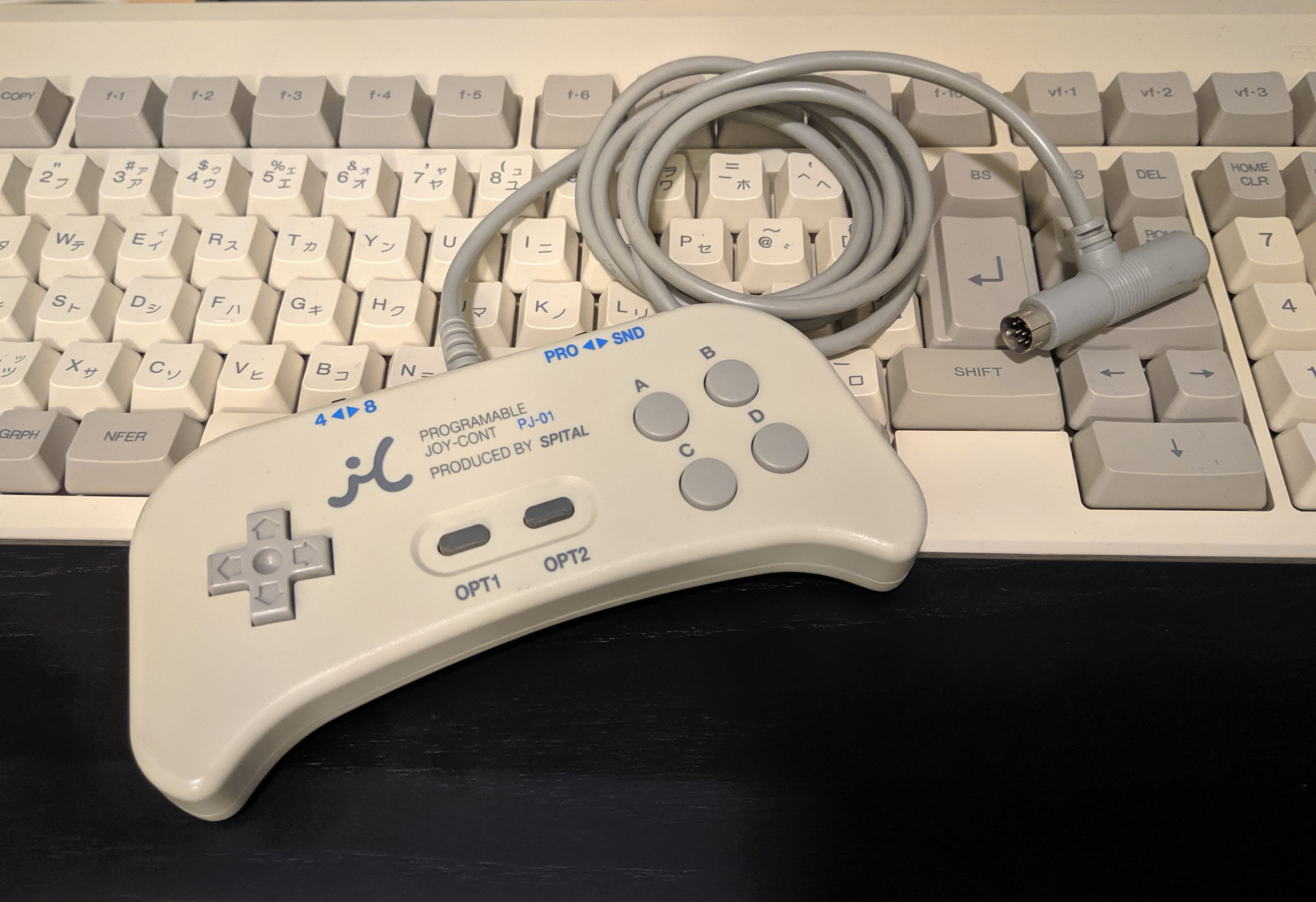
The Spital PJ-01 is a programmable controller that, according to the packaging, is compatible with the following computers (and possibly others):
- NEC PC-9801
- NEC PC-9821
- NEC PC-H98
- Epson PC-286/386/486
- PC-Club PC-286C
What makes this controller special is the fact that it sends keyboard inputs (it can even do macros!) instead of acting like a controller. A lot of games on the PC-98 will make use of a controller plugged into the sound card or mouse port, but not all will and several that do may be missing buttons.
Some of the most well known and beloved PC-98 games come from the Touhou series. I played my first Touhou shmup (I think it was probably Perfect Cherry Blossom) on an old Windows box but the series got its start on the PC-98. While most games on the PC-98 use two buttons, some of the later Touhou games use three (shot, bomb, and slow movement) which means most of my main controller is missing a button (the slow movement button in this case). The games are playable without this button but maneuvering through heavy cascades of boss bullets can be pretty rough at full speed. I have been looking for a way to improve the experience, without resorting to using the keyboard, and I came across this unique device. With the JoyCont you get the best of both worlds, the compatibility of a keyboard and comfort of a 6 button controller. So how does it work?
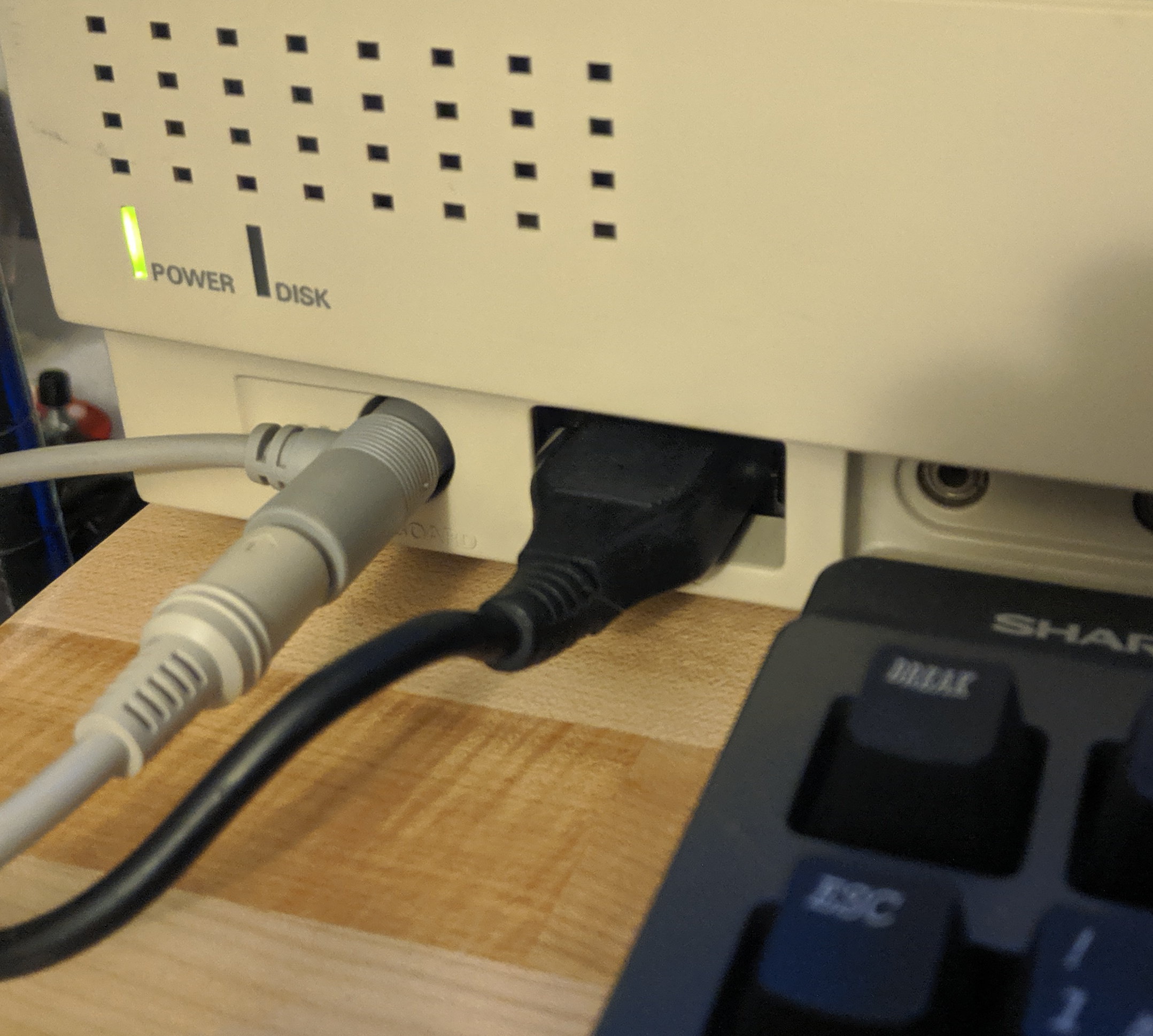 Keyboard plugged into JoyCont plugged into PC-9821
Keyboard plugged into JoyCont plugged into PC-9821
Button Programming
A PC-98 keyboard plugs into the female side of the JoyCont cable and the male side of the JoyCont cable plugs into the computer’s keyboard port. This allows the controller to intercept key presses while programming.
To program a button, for instance let’s program the A button to the SHIFT key.
- Set the selector switch to the PRO (program) side
- While holding down the A button, press the SHIFT key on the keyboard
- Set the switch back to the SND (send) side
- A should now be mapped to SHIFT
For Touhou games I first tested using this mapping:
| Touhou Action | JoyCont Button | Keyboard Key |
|---|---|---|
| Shoot | A | Z |
| Slow | C | SHIFT |
| Bomb | B | X |
| Pause | OPT2 | ESCAPE |
It felt decent but I always felt like I was going to accidentally bomb because of the buttons not being angled/rotated enough and the edge of my thumb was always touching the B button. I then tried the following mapping which I felt worked pretty well and will be what I stick with for now:
| Touhou Action | JoyCont Button | Keyboard Key |
|---|---|---|
| Shoot | B | Z |
| Slow | D | SHIFT |
| Bomb | A | X |
| Pause | OPT2 | ESCAPE |
Directional Pad
The direction pad can be used in two different ways, 4 and 8 mode.
- In 4 mode, diagonals on the controller are combinations of two buttons (ex: Up + Right on the controller will register as 8 + 6 on the keyboard number pad)
- In 8 mode, diagonals on the controller register as separate inputs (ex: Up + Right on the controller will register as 9 on the keyboard number pad)
For Touhou games I leave the controller in 4 mode.
Note: the directional pad can be remapped the same way you remap action buttons above which is great for games that may use the arrow keys on the keyboard or even other random keys for movement.
Review
After programming the controller’s buttons I set out trying some games. Here’s a list of Touhou games tested:
- Highly Responsive to Prayers
- Normal controllers do not work at all with this game so the JoyCont, acting as a keyboard, makes this game playable for me
- Story of Eastern Wonderland
- Normal controllers do not work at all with this game so the JoyCont, acting as a keyboard, makes this game playable for me
- Phantasmagoria of Dim.Dream
- Works fine with this game but since Phantasmagoria has only two buttons the JoyCont doesn’t offer anything unique
- Lotus Land Story
- JoyCont offers the ability to use all 3 action buttons in this game which I cannot do with other controllers
- Mystic Square
- JoyCont offers the ability to use all 3 action buttons in this game which I cannot do with other controllers
After playing for about 30 minutes, I switched back to my normal controller which plugs into the mouse port on my PC-9821Ap. I immediately noticed how responsive the old controller felt. After switching back and forth a few times I can say with some certainty that the JoyCont has several frames of input delay. This was unexpected and truly disheartening as it made playing games with lots of heavy action, like Shmups, more difficult than they already are. It felt like the character I was controlling had gained a good 30 pounds and I was dragging them behind me.
Recommendations
I have very mixed feelings about this controller. It does function for what it was made for. With this controller, not only do I get full use of all game buttons in Touhou games, but I’m able to play some of the older Touhou games with a controller, which is amazing in its own right. If it wasn’t for the, obvious to me, latency on all inputs I would be able to wholeheartedly recommend the JoyCont, but because of this, I don’t think I’ll be fully switching to this controller over my, near zero frame delay, other controllers. Some of you may not be bothered by, or even notice the input delay when using this controller, but if you are sensitive to that kind of thing then you may want to stay clear of this one. If you are still interested, they show up occasionally on Yahoo JP Auctions ranging from 3,000¥ to 9,000¥.